Deployment
Previous: SLA System
Next: Testing & Validation
Deployment uses setup.sh in smart-estate and is currently implemented for Debian/Ubuntu hosts.
1) Practical deployment flow
setup.sh guides operators through repository access, domain values, and runtime settings, then applies a consistent host setup and Compose deployment.
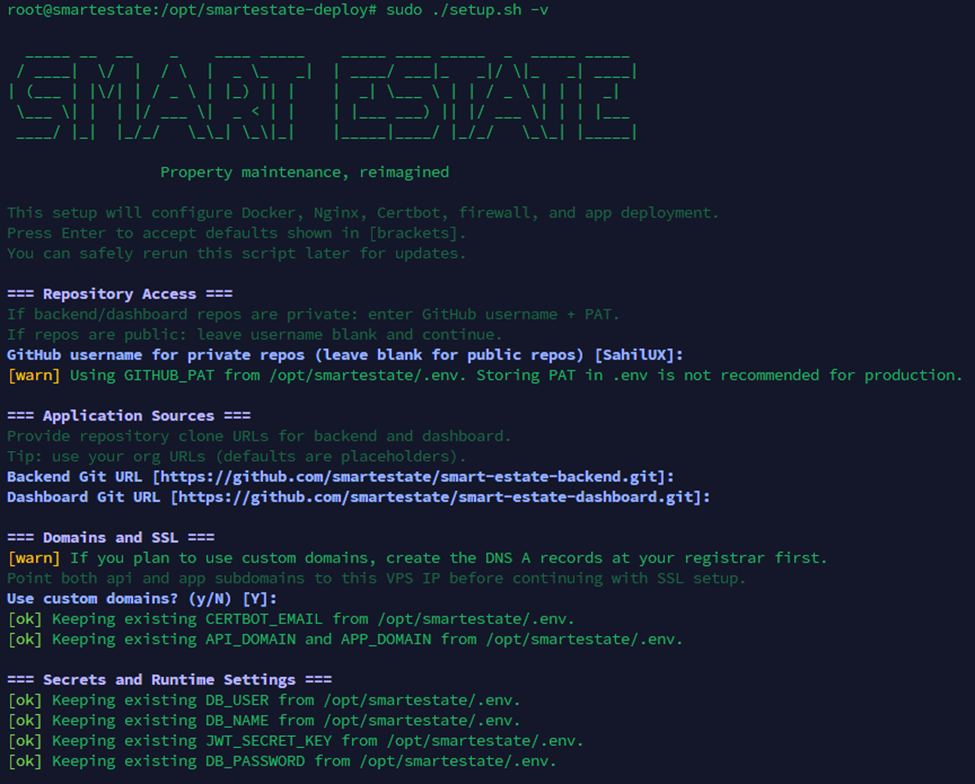 Caption: Installer flow used during setup, showing repository authentication, domain mapping, and runtime configuration prompts.
2) What setup.sh does
- Enforces root and Debian/Ubuntu prerequisites.
- Installs/updates required host packages and runtime dependencies.
- Clones/updates backend and dashboard repositories.
- Builds/starts Compose services.
- Creates shared runtime directories under
/opt/smartestate. - Handles optional self-update behavior for the deployment repo.
3) First-time setup
git clone https://github.com/smartestate/smart-estate.git /opt/smartestate-deploy
cd /opt/smartestate-deploy
sudo ./setup.sh
4) Update existing install
cd /opt/smartestate-deploy
git pull --ff-only
sudo ./setup.sh --no-self-update
5) Useful flags
-h,--help-v,--verbose--no-self-update
6) Runtime layout
/opt/smartestate/.env/opt/smartestate/uploads/opt/smartestate/saved_models/opt/smartestate/backups/opt/smartestate/smart-estate-backend/opt/smartestate/smart-estate-dashboard
7) Compose services
postgres(PostgreSQL 15)backend(FastAPI)dashboard(Nginx static build)
8) Environment expectations
Main runtime keys (from env.sample):
- DB:
DB_USER,DB_PASSWORD,DB_NAME,DB_HOST,DB_PORT - Auth:
JWT_SECRET_KEY,JWT_ALGORITHM,JWT_EXPIRY_MINUTES - Web/API:
VITE_API_URL,API_DOMAIN,APP_DOMAIN,CORS_ORIGINS - Optional integrations:
OPENAI_API_KEY,ORS_API_KEY,OPENROUTESERVICE_API_KEY,SENTRY_DSN
Optional setup defaults:
BACKEND_REPO,DASHBOARD_REPO,GITHUB_USERNAME,GITHUB_PAT
9) Security and secrets
- For automated repository access,
GITHUB_PATcan be used during setup when required by your environment. - Use a secret manager for
JWT_SECRET_KEY, DB credentials, and API keys in production.
10) Validation checklist after deploy
GET /healthreturns success.- Dashboard can authenticate against backend.
- Ticket create/update flow works from dashboard.
- Upload and report endpoints can read/write mounted volumes.
Previous: SLA System
Next: Testing & Validation